


Have you ever tried to watch a video online, only to be met with the frustrating message: “This content is not available in your country”? Or perhaps you’ve been at school or work and found your favorite social media site mysteriously blocked. In many of these situations, a “proxy” is involved—and it can also be the solution. Find the best proxies for google ads.
Imagine you want something from a special store, but you can’t go yourself. Instead, you send a personal shopper to go buy it for you. To the store, it just looks like your shopper made the purchase; they never see you at all. On the internet, this helpful middleman is a proxy server. This simple idea is the key to understanding how they work.
This guide will break down the proxy definition in simple terms, explore why you might use one, and cover the very real risks you need to be aware of. Not all proxies are created equal, and some can be more dangerous than helpful. We’ll also clear up one of the biggest points of confusion online: the difference between a proxy and a VPN. You don’t need to be a tech expert to follow along; our goal is a clear, confident answer to the question, “What is a proxy?”—no complex jargon required.
What is an IP Address? Your Unique ‘Return Address’ on the Internet
Think about sending a letter. For the post office to deliver a reply, you have to include a return address. The internet works in a surprisingly similar way. When you visit a website, your device needs to tell that site exactly where to send back the images, text, and videos you want to see.
That digital “return address” is your IP address (short for Internet Protocol address). It’s a unique string of numbers that identifies your device on the internet. Without it, YouTube wouldn’t know where to send the cat video you requested. Just as a physical address reveals a general location, your IP address gives websites a clue about your country and city, which is why some content is “not available in your region.”
Because every website you visit can see this address, many people look for ways to hide their IP address online for greater privacy. This technique, IP address masking, is the foundational trick that makes a proxy server work.
How a Proxy Hides Your ‘Return Address’ With a Simple Switch
The secret to how a proxy server works is surprisingly simple: it acts as a middleman. Instead of sending your request for a website directly from your computer, you send it to the proxy server first. Think of it like asking a friend to pick up a package for you—you don’t go to the store yourself.
Once the proxy receives your request, it forwards it to the website you want to visit. But here’s the crucial part: when the proxy makes this request, it doesn’t use your IP address. It uses its own. This process is the essence of IP address masking. The proxy essentially tells the website, “Send the information back to my address,” completely hiding your original “return address” from view.
To the website, the entire visit appears to come from the proxy server. If the proxy is located in Germany, the website thinks the visitor is in Germany. It has no idea that the request originally came from your device somewhere else in the world. The website then sends the information (the article, video, or webpage you wanted) back to the proxy.
Finally, the proxy server seamlessly passes that information back to you, completing the loop. This simple but powerful switch is what allows a proxy to change your perceived location online, opening up possibilities from accessing geo-blocked content to adding a basic layer of privacy.
Use Case #1: Unblock and Watch Shows From Other Countries
One of the most common reasons to use a proxy is to bypass geo-blocking. This happens when streaming services, news outlets, and shopping sites check your IP address to see where you are in the world, then grant or deny access based on licensing agreements or regional rules.
A proxy becomes your digital passport. Since a proxy replaces your IP address with its own, you can choose a proxy server located in the country you want to appear from. For instance, if you’re in Europe and want to access a streaming service’s American library, you would connect to a proxy server in the United States. When you visit the streaming site, it sees the American proxy’s IP address and treats you like a local viewer, unlocking the content.
By simply routing your request through a middleman in another country, you effectively bypass the digital border that was blocking you. The website delivers the content to the proxy, and the proxy sends it right back to you. This same principle also applies to simpler restrictions you might find closer to home.
Use Case #2: Get Around Simple Website Blocks at School or Work
That same principle of bypassing digital borders applies to roadblocks on local networks, like at a school, library, or office. If you’ve ever been met with an “Access Denied” page for a social media site, it’s because the network administrator has a blacklist of specific website addresses. The network acts like a security guard, checking every request and blocking any that are headed to a forbidden destination.
A proxy creates a digital detour. Your computer doesn’t directly ask the school network for facebook.com. Instead, it asks the network for permission to talk to the proxy server. Since the proxy’s address usually isn’t on the blacklist, the network guard waves the request through. The proxy then fetches the content from the blocked site on your behalf and sends it back to you, hiding your request in plain sight.
However, this method isn’t foolproof. Network administrators can—and often do—add popular proxy services to their blocklists. More importantly, trying to get around these filters is almost always against an organization’s “acceptable use” policy, which can lead to disciplinary action.
Use Case #3: Add a Basic Layer of Privacy to Your Browsing
Many people use a proxy to “hide their IP address” and add a layer of privacy to their online activity. When you use a proxy, the website you visit only sees the proxy’s IP address, not yours. To that website, your request looks like it came from the proxy’s location, effectively masking your own.
This IP masking has practical benefits. Some e-commerce or travel websites track visitors by IP address. If they see you repeatedly checking a flight price, they might show you a higher price on your next visit. By using a proxy for online privacy, you can appear as a new visitor each time to see standard pricing and avoid this type of tracking.
It’s crucial to understand who you are hiding from—and who you are not. While the final website can’t see your real IP, your Internet Service Provider (like Comcast or Verizon) can see you’re connecting to a proxy. More importantly, the proxy provider itself can see your real IP address and which websites you are visiting. You’ve simply shifted who gets to see your browsing habits. This distinction is key to understanding proxy safety.
The “Free Lunch” Problem: Are Free Proxies Spying on You?
In the digital world, “there’s no such thing as a free lunch” often holds. Running a proxy server costs money, and if a provider isn’t charging you, they have to make money somehow. Often, their business model is built around your data. When you use a free proxy, you aren’t the customer; you are the product.
This creates enormous risks. Trusting a random free proxy is like handing your house keys to a stranger and hoping they don’t look through your personal belongings. The dangers are not just theoretical and fall into three main categories:
- Data Theft: The proxy can read any unencrypted information that passes through it, including usernames and passwords for websites that aren’t secure (without the padlock icon).
- Activity Logging: The provider can keep a detailed record of every website you visit. This browsing history is often sold to data brokers, advertisers, or other third parties.
- Malware Injection: A malicious proxy can change the websites you visit, inserting unwanted ads, redirecting you to scam sites, or even injecting malware onto your computer.
While a proxy hides your activity from the final website, it opens you to surveillance from the provider. This leads to the question of how to get privacy benefits without these security risks, which lies in understanding the difference between a proxy and a VPN.
Proxy vs. VPN: The Armored Car and the Chauffeur Analogy
While proxies and VPNs can both change your apparent location online, their core purposes are different. The chauffeur and the armored car analogy clears up the confusion instantly.
A proxy acts like a chauffeur for a single application, usually your web browser. When you want to visit a website, you tell the proxy, and it goes there for you. However, it only handles traffic for that one app. Your other apps, like your email client or a video game, still use their own routes.
A VPN, on the other hand, is like a private, armored tunnel for your entire internet connection. It doesn’t just serve one app; it protects everything. Once you connect to a VPN, every bit of data leaving your device—from browsing, streaming, gaming, and background apps—is routed through this secure passage.
The most critical difference is that the armored tunnel provides encryption. A VPN scrambles your data, making it unreadable to anyone who might intercept it, including your internet service provider or snoops on public Wi-Fi. Most simple proxies do not offer this security. Essentially, a proxy hides your address, but a VPN hides your address and protects the contents of your delivery.
A Simple Checklist: When Should You Use a Proxy?
Given that a VPN offers more protection, you might wonder why anyone would choose a proxy. The answer is simple: you don’t always need an armored car for a quick errand. The benefits of a proxy server shine in specific, low-stakes scenarios where convenience is more important than total security.
A proxy is a good choice if:
- You need a quick, temporary way to access a geo-blocked video or article.
- You want to bypass a simple content filter on a network at a library, school, or café.
- The task is low-risk and involves no sensitive information like passwords or credit card numbers.
- Speed for a single app (like your browser) is more important than encrypting your entire connection.
In these cases, the goal is simple access, not ironclad security. For any situation where privacy and protecting personal data are non-negotiable, you’ll want the reinforced protection of a VPN.
A Simple Checklist: When Should You Use a VPN?
The key difference between a proxy and a VPN is that a VPN creates a private, encrypted tunnel for your entire internet connection, a level of security that a simple proxy can’t match. For any activity where data safety is a priority, a VPN is essential.
Use a VPN when:
- You are using public Wi-Fi (at a café, airport, or hotel). These networks are notoriously insecure, and a VPN shields your activity from snoops on the same connection.
- You are handling any sensitive data, like online banking, shopping with a credit card, or logging into important accounts.
- You want comprehensive privacy from your Internet Service Provider (ISP), advertisers, and other online trackers.
- You want to protect all internet traffic from your device, including apps and background processes, not just your browser.
Choosing between these tools comes down to your goal. Is using a proxy safe? For casual, non-sensitive tasks, often yes. But for true peace of mind and robust protection of your personal information, the security-first approach of a VPN is always the right call.
How to Set Up a Proxy in Chrome: A 5-Step Visual Guide
While there are many types of proxy servers, the practical steps for using one are straightforward. Most modern browsers, including Google Chrome, hand this job over to your computer’s main operating system settings. Here’s a typical five-step process:
- In Chrome, open Settings (click the three dots in the top-right corner).
- In the search bar, type “Proxy” and press Enter.
- Click the result that says Open your computer’s proxy settings. A new window from your operating system will appear.
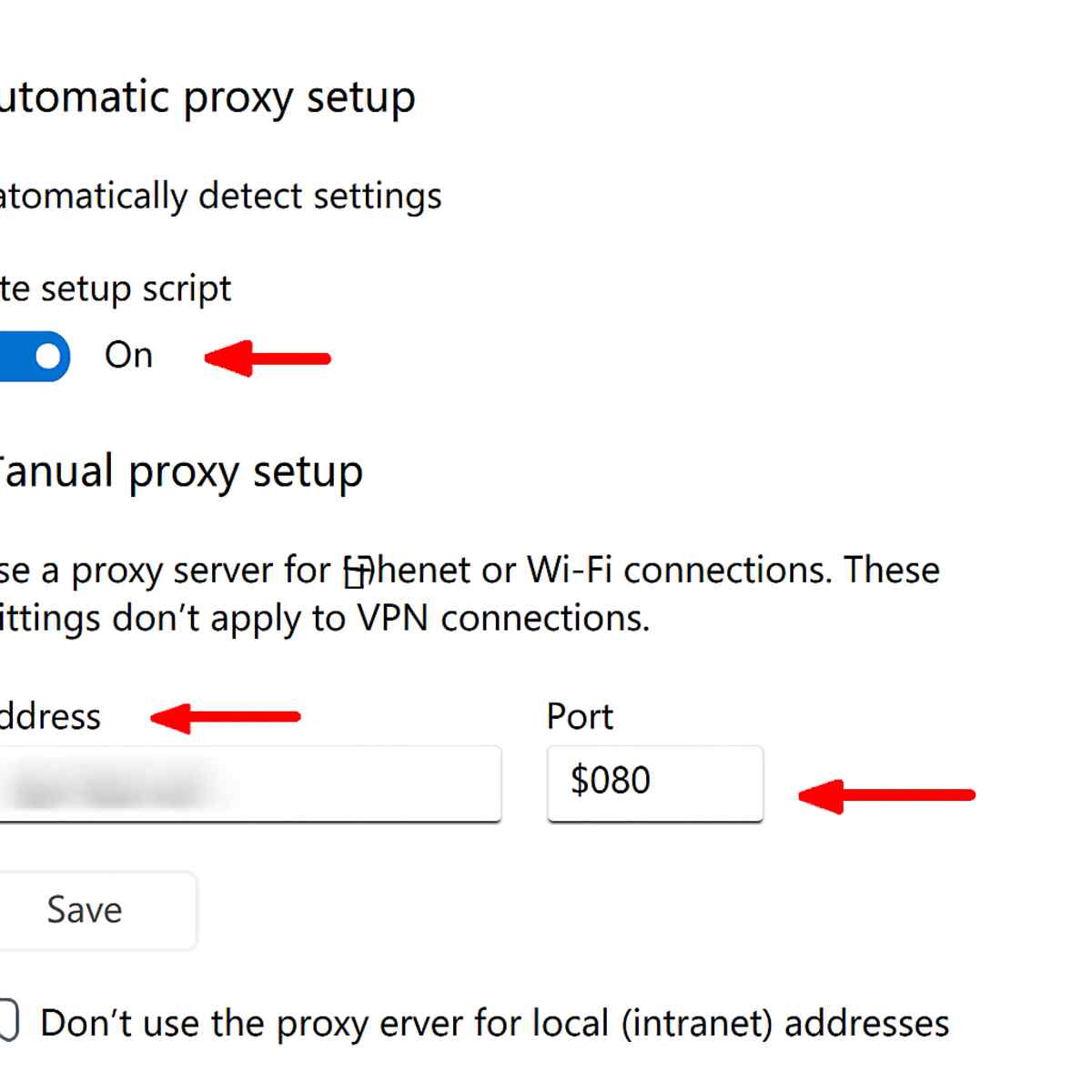
- Find the section for Manual proxy setup and toggle it On.
- Carefully enter the server Address and Port number you were given.
You’ll notice two fields: “Address” and “Port.” The Address is the unique IP address of the proxy server, and the Port is like a specific door number at that address. This brings a critical warning: by doing this, you are routing your browser’s traffic through someone else’s server. Therefore, you should only ever use proxy details from a source you absolutely trust, like your school or office IT department, or a paid proxy service with a strong reputation. Using a random, free proxy you find online can be very risky.
Using Proxies and VPNs Wisely
The word “proxy” is no longer a confusing bit of jargon, but a simple middleman on the internet. Understanding it as a digital “personal shopper” that makes requests for you is the key to how it operates, from accessing content in another country to why you must be careful about whom you trust. Just like with a real shopper, using a free or untrustworthy service comes with risks—it might be slow, unreliable, or worse, peek into your shopping bag.
This leads to the critical decision between a proxy and a VPN. Remember the key difference: a proxy is a chauffeur for a single app, while a VPN is a secure, armored tunnel for your entire connection. Your rule of thumb should be simple: use a proxy for low-stakes tasks, but always choose a VPN when privacy and security matter.
By demystifying this concept, you have gained practical knowledge to help you browse the internet more freely and safely.
